Desk Lighting for Sensory-Sensitive Workspaces
This site contains affiliate links. If you purchase through our links, we may earn a commission at no extra cost to you. We only recommend products we'd use ourselves.
Flicker is the thing most lighting reviews don't measure. Standard bulbs and cheap LEDs flicker at 100–120Hz—fast enough that your conscious brain doesn't register it as flicker, slow enough that it generates a constant, low-level load on your visual system. For many people this produces nothing noticeable. For others it's a slow headache that builds over an afternoon, a vague eye strain that's hard to trace to a source, or an inability to sustain focus for more than thirty or forty minutes before needing to look away.
Color temperature matters too, but differently. Cooler light (5000K–6500K, the blue-white end) increases alertness by suppressing melatonin—useful during morning work sessions, counterproductive at 9pm. Warmer light (2700K–3000K) is easier on the eyes but can slow you down during tasks that require high sustained attention. Most people don't think about this consciously; they just notice they feel worse working by certain lights without knowing why.
The right desk light matters more than most people realize because you can't see bad lighting the way you can see a scratchy chair or a loud neighbor. It just quietly makes everything harder. The wrong light doesn't announce itself. It just makes a four-hour session feel like six.
What We Tested For
Flicker was evaluated at full brightness and at 20–30% brightness, where many LEDs that are flicker-free at full power start flickering as they dim. Color temperature range and accuracy. Whether the light produces visible glare on the monitor—which is a function of both the light's angle and the way it's designed. Control simplicity: how many steps does it take to change brightness or color temp mid-session, and does the control itself interrupt focus or support it. Brightness range, particularly whether the low end is genuinely dim or just "slightly less bright."
Quick Comparison
| Product | Price | Flicker-Free | Color Temp Range | Controls | Screen Glare | Rear Ambient |
|---|---|---|---|---|---|---|
| BenQ ScreenBar Halo | $179 | Yes, all brightness | 2700K–6500K | Wireless dial | None | Yes |
| BenQ ScreenBar | $109 | Yes, all brightness | 2700K–6500K | Touch bar (top) | None | No |
| Dyson Solarcycle Morph | $649 | Yes | Auto (location/time) | App + touch | Adjustable | No |
| Bias lighting strips | $15–30 | Varies by model | Fixed (warm white best) | Plug in and forget | N/A | Yes (that is the product) |
BenQ ScreenBar Halo
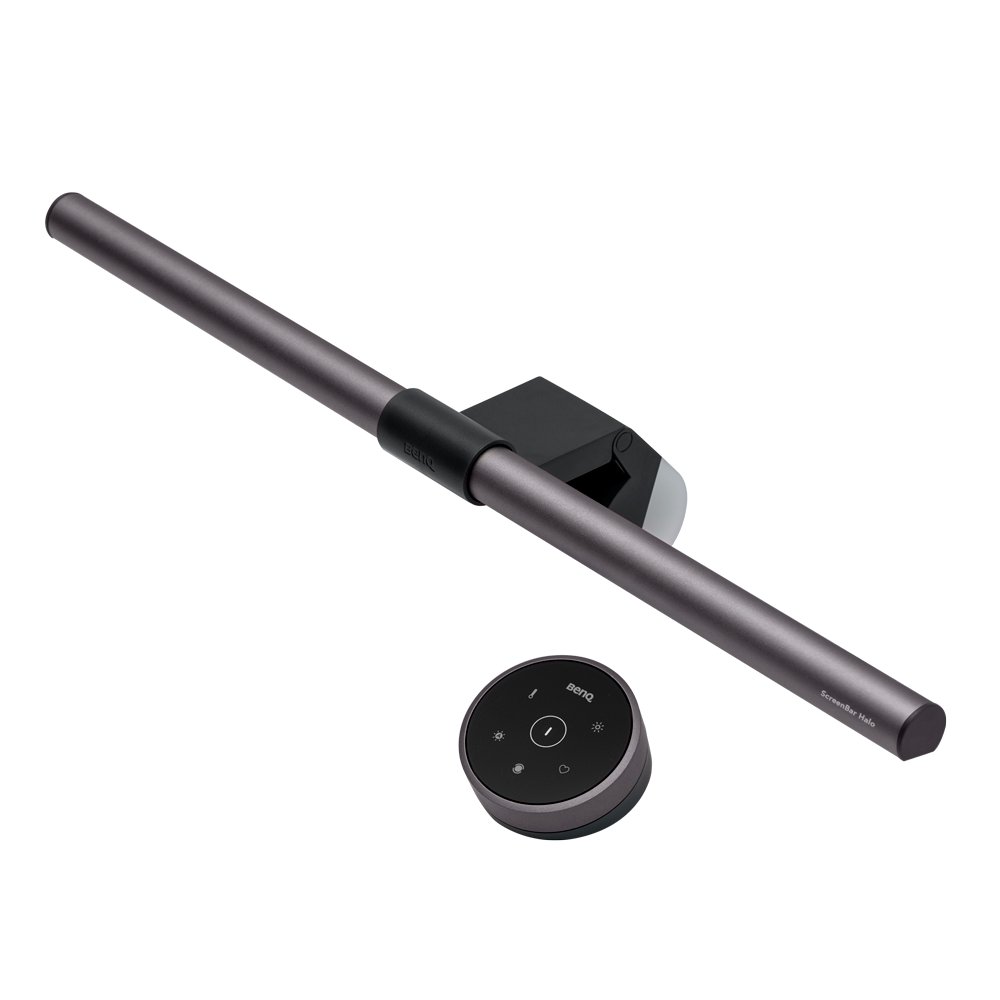
BenQ ScreenBar Halo
$179
- Type: Monitor-mounted + rear glow
- Color temp: 2700–6500K
- Controls: Wireless dial
The ScreenBar Halo solves two problems simultaneously: it provides flicker-free task lighting at every brightness level, and its rear ambient glow fills the wall behind the monitor with soft, diffuse light that reduces the contrast differential between a bright screen and a dark room. That contrast differential—bright rectangle surrounded by darkness—is one of the main drivers of eye fatigue during long screen sessions. The Halo addresses it without requiring a second light source or a second decision.
The wireless dial controller is worth calling out specifically. It sits on your desk, turns smoothly, and adjusts brightness with an immediacy and tactile satisfaction that touch controls don't match. When you need to dim the light because you've shifted to reading something on paper, or crank it up because the afternoon light through the window has changed the room's overall brightness, you reach for the dial without taking your eyes off the screen. One physical action, immediate feedback. No fumbling for a touch zone, no looking at a panel to verify the adjustment registered.
The light itself aims downward and forward at an angle calculated to avoid hitting the monitor surface—which is why monitor-mounted light bars don't create the glare that a conventional lamp positioned behind or beside the monitor would. At 2700K the warmth is genuinely warm, comparable to incandescent. At 6500K it reads as clean daylight. The range between is smooth and linear. No flicker at any point in the brightness range, including at 5% where many LED dimming implementations start to show pulse.
At $179 it's the most expensive light here that isn't the Dyson. For a fixed desk setup, it's a one-time purchase that affects every hour you spend at that desk. The math on cost-per-session improves fast.
View on AmazonBenQ ScreenBar
BenQ ScreenBar
$109
- Type: Monitor-mounted
- Color temp: 2700–6500K
- Controls: Touch on bar
The standard ScreenBar is the same light bar as the Halo—same color temperature range, same flicker-free performance across the entire brightness range, same downward-angled design that keeps light off the screen surface. The differences are the rear glow (absent here) and the controls. The ScreenBar uses a touch-sensitive strip along the top edge of the bar rather than a wireless dial. Reaching up to the bar to adjust brightness is a larger interruption than reaching to a desk-level dial. Not a significant problem for most use cases, but noticeable if you adjust frequently.
The touch controls work reliably—no false triggers, the sensitivity is calibrated well enough that light brushes don't register as intentional touches. The issue is the physical reach and the lack of tactile feedback. You're adjusting by sliding your finger along a strip with no click or detent to confirm the adjustment landed where you intended. For people who rely on tactile confirmation that a control worked, the dial on the Halo is a meaningful improvement over this.
Without the rear glow, monitor-wall contrast remains unaddressed. If your desk is positioned against a wall, the contrast between the bright monitor and the dark area around it is the same as any other lamp situation. The ScreenBar improves it compared to having no desk light—task lighting brightens the desk surface, which the eye uses as a reference—but it doesn't manage the area directly behind and around the screen the way the Halo does.
At $109, the ScreenBar makes sense if the budget matters, your desk isn't against a wall, or you've already addressed the monitor-wall contrast issue with bias lighting strips behind the monitor. If your desk is against a wall and screen sessions regularly run past two hours, the $70 difference for the Halo is worth it.
View on AmazonDyson Solarcycle Morph
Dyson Solarcycle Morph
$649
- Type: Desk lamp
- Color temp: Auto-adjusting
- Controls: App + manual
The Solarcycle Morph is a genuinely impressive piece of engineering with some design decisions that complicate the picture for this audience. It automatically adjusts color temperature based on your location and the time of day—cooler in the morning, gradually warmer through the afternoon and evening, tracking the arc of daylight your body's circadian system expects. If you trust it and leave it alone, it does the right thing. The light quality itself is excellent: high CRI (color rendering accuracy), flicker-free, and bright enough to serve as the primary task light in any room.
The complications are two. First, app dependency. The automatic adjustment works via the MyDyson app. Changing the schedule, setting manual overrides, or adjusting settings requires the app. For people who already manage a phone covered in notifications and feel a reflexive resistance to adding one more app that can interrupt them, this is a friction point that doesn't go away. The lamp works without the app—it runs on its last setting—but you're not using most of what you paid for if you avoid it.
Second: the auto-adjustment is visible in motion. The color temperature doesn't jump—it shifts gradually—but if you're someone who notices gradual environmental changes and finds them difficult to filter out, you may find yourself aware of the light changing during afternoon hours when the transition is most pronounced. The shift is designed to be imperceptible; for some people it is. For people with high sensory sensitivity to visual changes, it can pull attention at unpredictable intervals.
The lamp itself can articulate into multiple configurations—task light, spot, ambient—and the build quality is unmistakably in a different category than the BenQ. If you already own the lamp or the design is a specific priority, it's excellent. As a recommendation for this audience specifically, the executive function overhead and the visible color shifts during transition periods push it to a secondary option despite the quality of the light itself.
View on AmazonBias Lighting Strips
Bias Lighting Strips
$15–30
- Type: LED strip (behind monitor)
- Color temp: Warm white
- Controls: USB on/off
Bias lighting—LED strips mounted behind a monitor—is the cheapest, simplest, and most overlooked lighting improvement for screen workers. The strips illuminate the wall directly behind the monitor, reducing the luminance contrast between the bright display and the dark wall surrounding it. Your visual system works hardest when it's handling extreme contrast transitions—scanning from a 400-nit monitor to a nearly-black wall and back, hundreds of times per hour. Bias lighting compresses that contrast range. The screen looks the same. The eye strain that accumulates over a long session is measurably lower.
The implementation is USB-powered strips that attach to the back of the monitor with adhesive backing. Plug in, position the strip so it illuminates the wall rather than casting light around the sides of the monitor toward your eyes, and you're done. There's nothing to adjust, no app, no settings menu. It's on when the monitor is on and off when it's off. The entire setup takes about ten minutes.
Get warm white—2700K to 3000K. Not the RGB strips that let you pick any color. Those are a different product for a different purpose. The temptation to cycle through colors, or to land on something that looks visually interesting but that your eyes spend energy processing, eliminates the benefit. Warm white. Fixed. Set it and stop thinking about it. Govee and other budget brands produce functional strips in the $15–30 range that work exactly as well for this purpose as expensive ones.
Bias lighting doesn't replace a task light—it doesn't illuminate your desk surface for writing or reading physical materials. It's a background effect that works alongside whatever primary lighting you have. The BenQ ScreenBar Halo includes a rear glow that does the same job with cleaner installation; the trade-off is $179 versus $20. If you already have a task light you're satisfied with and you've been dealing with eye strain that doesn't have an obvious source, a $20 bias lighting strip is worth trying before replacing anything else.
View on AmazonBottom Line
The BenQ ScreenBar Halo is the default recommendation for anyone doing long screen sessions: flicker-free at every brightness level, physical dial control that doesn't interrupt focus, and rear ambient glow that handles monitor-wall contrast in a single fixture. The standard BenQ ScreenBar covers the same ground minus the rear glow and the dial—a solid choice if your desk placement means contrast isn't an issue or if you're already addressing it with bias strips.
The Dyson Solarcycle Morph is excellent lighting in a package with more complexity than most of this audience needs. The auto-adjustment is genuinely useful if you trust it and leave it alone; it becomes a source of distraction if you're sensitive to gradual visual changes.
Bias lighting strips belong in every screen-based workspace regardless of what else you're using. At $15–30, the return on the contrast reduction is disproportionately high for something that takes ten minutes to set up and then disappears from your awareness entirely.
Lighting is one part of building a workspace that your sensory system can actually work in. The workspace lighting guide covers how desk lighting interacts with overhead room lighting, window placement, and time-of-day adjustments to build a complete picture.